
How to Query GA4 Top Pages in BigQuery by Event: A Step-by-Step Tutorial

If you’ve been diving into Google Analytics 4 (GA4) data and want to uncover which pages on your website drive the most views, conversions, or other key actions, querying GA4 data in BigQuery is a powerful approach. In this tutorial, I’ll guide you through extracting and analyzing your GA4 top pages BigQuery data by event type using a simple yet effective SQL query.
Before we jump in, if you prefer a video walkthrough, you can watch the full tutorial here: Watch the GA4 Top Pages BigQuery Video Tutorial.
Step 1: Understand Where GA4 Stores Page URLs in BigQuery
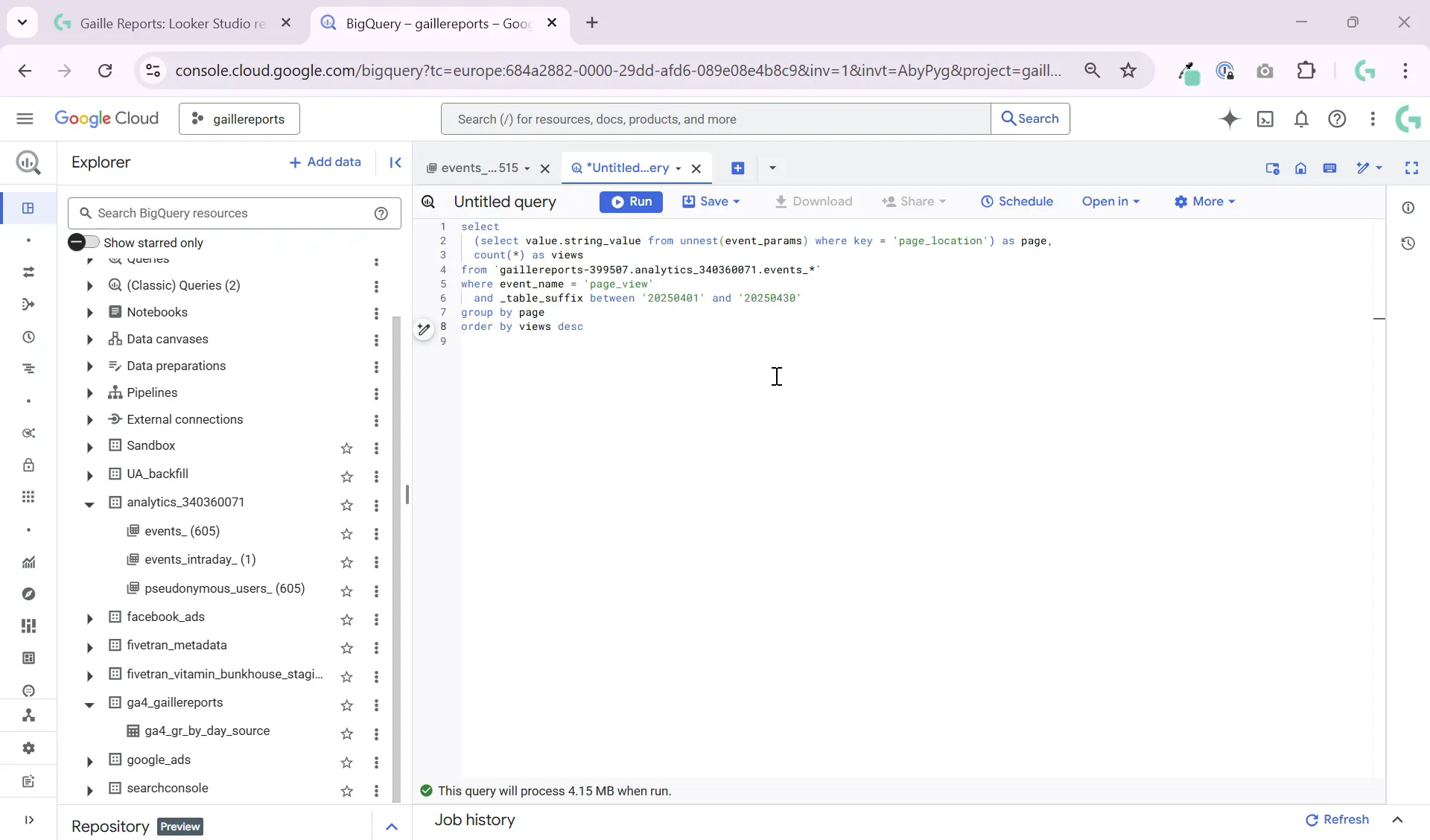
Google Analytics 4 stores raw event data in BigQuery with a flexible schema that includes event parameters. Every event row contains an array of key-value pairs representing event parameters. Among these parameters, the page URL is stored inside the page_location key.
This means for every event—whether it’s a page view, form submission, or purchase—the associated page URL is embedded in the event parameters as a string value. To analyze which pages generate the most activity, we need to extract this page_location value from the nested event parameters array.
Step 2: Write a SQL Query to Extract Page URLs and Count Events
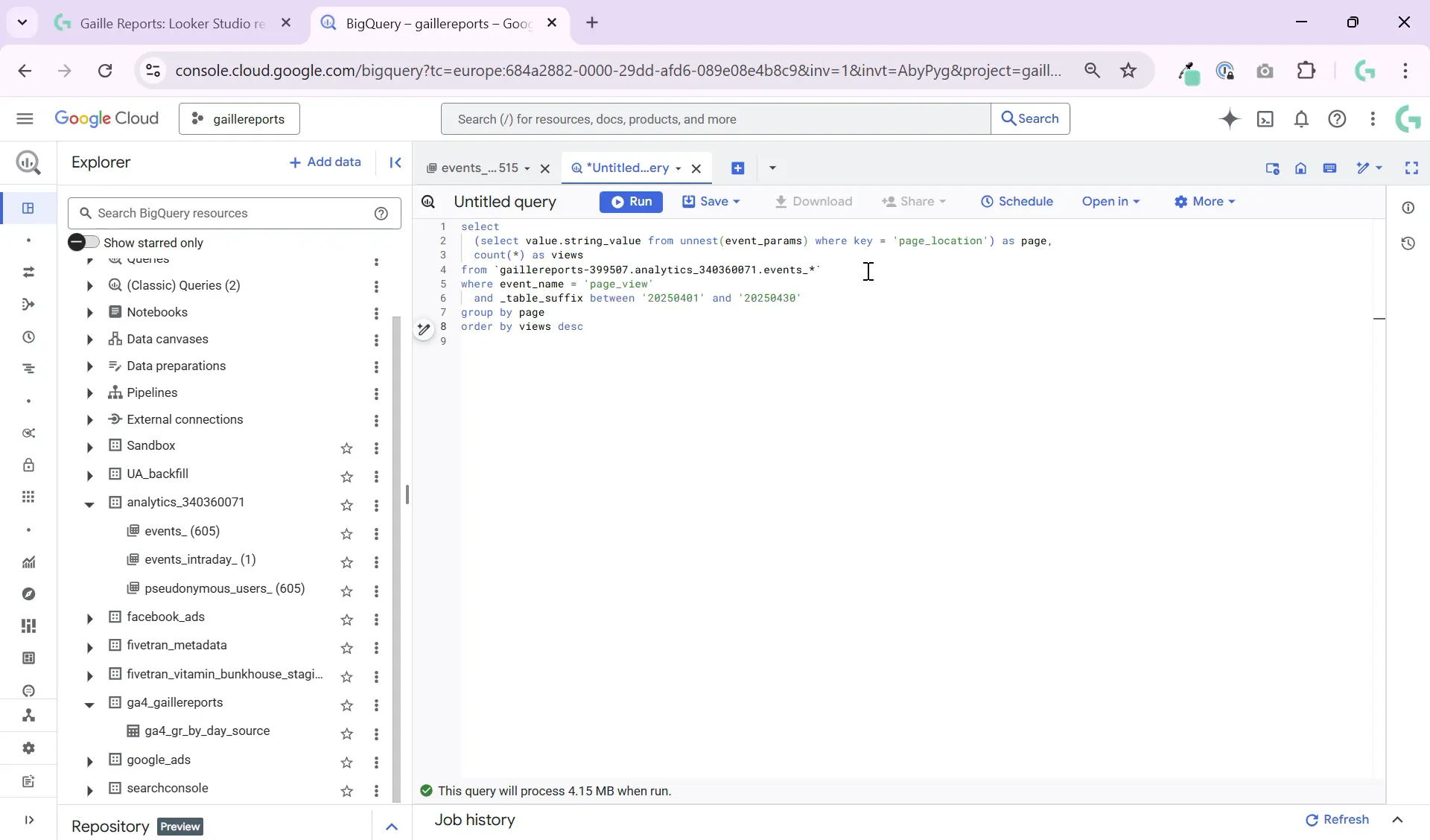
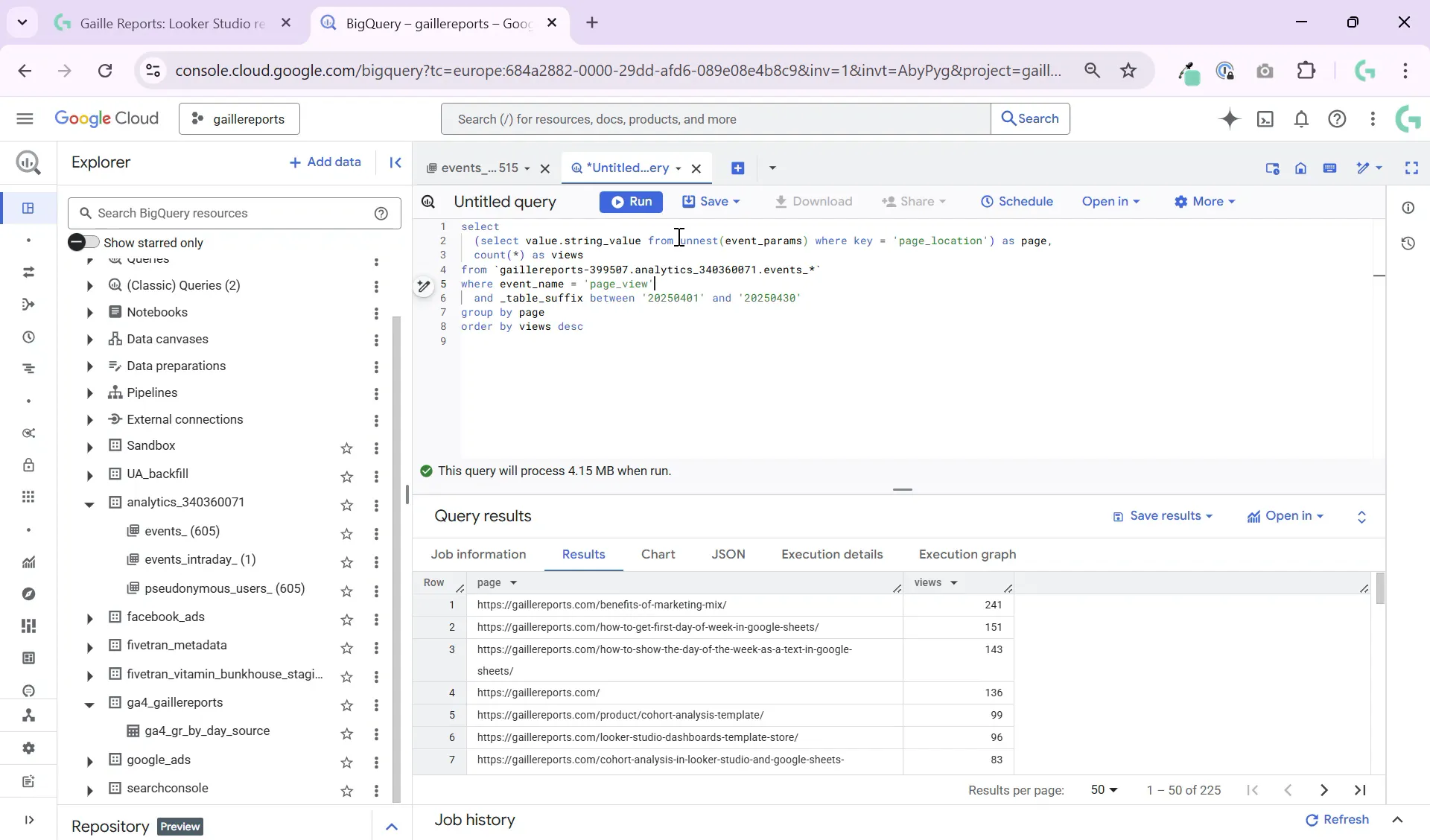
To pull out the page URLs and count how many times each page appears for a specific event type (like page_view), we use a subquery to filter the event parameters array and extract the string value where the key is page_location.
The query structure looks like this:
SELECT
  (SELECT param.value.string_value
   FROM UNNEST(event_params) AS param
   WHERE param.key = 'page_location') AS page,
  COUNT(1) AS views
FROM `your-project.your_dataset.events_*`
WHERE event_name = 'page_view'
GROUP BY page
ORDER BY views DESC
Here’s what each part does:
- Subquery in SELECT: Extracts the string value of
page_locationfrom the event parameters array. - WHERE event_name = ‘page_view’: Filters the query to count only page view events (you can replace this with any event name).
- GROUP BY page: Groups all events by their page URL.
- ORDER BY views DESC: Sorts pages by the number of views, from highest to lowest.

Step 3: Use Table Suffixes for Efficient Querying
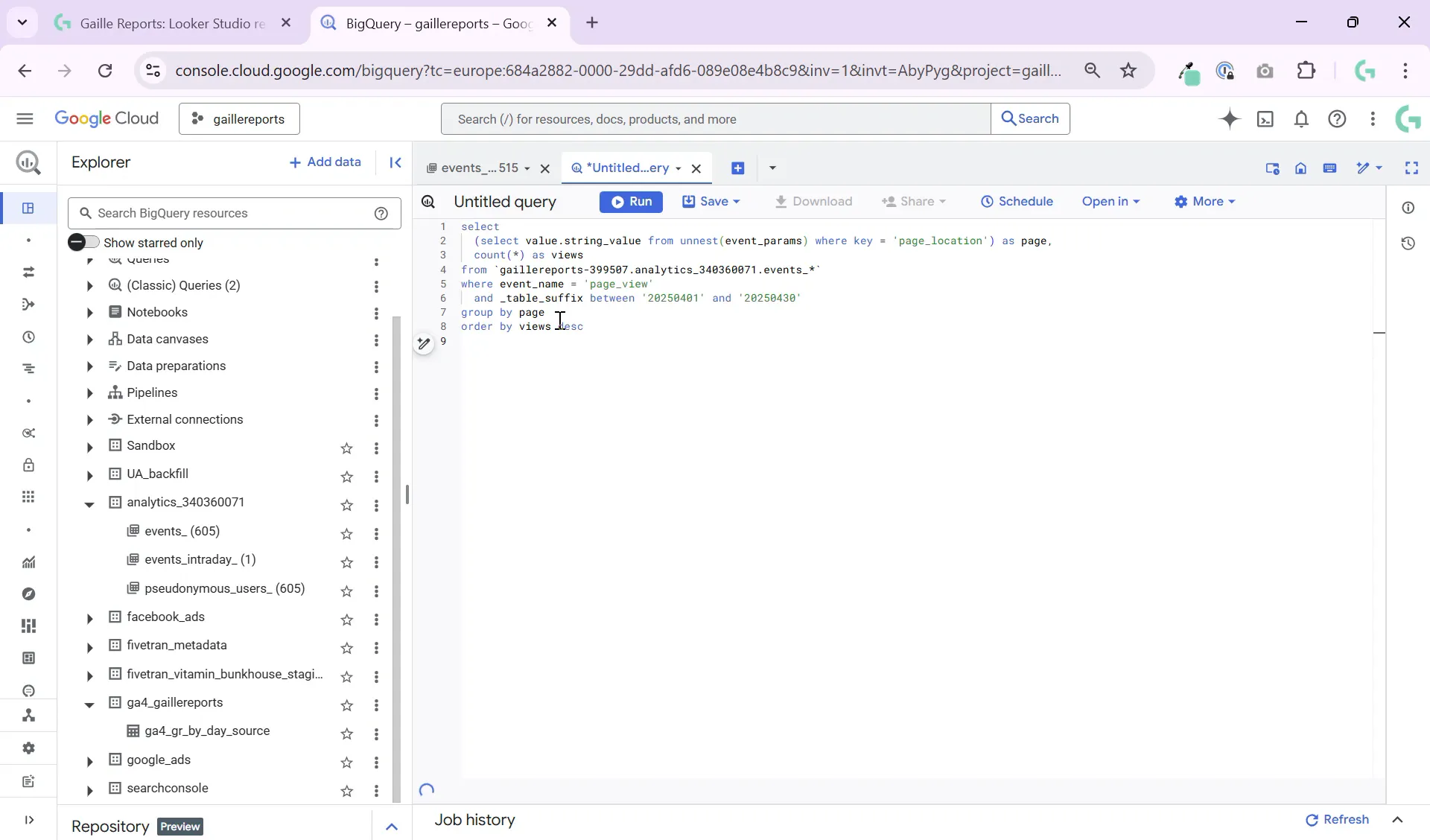
GA4 exports data to BigQuery in daily tables with suffixes, such as events_20230501, events_20230502, and so on. To query across multiple days efficiently, use a table wildcard with a suffix pattern, like events_*. This allows your query to scan multiple daily tables at once.
For example:
FROM `your-project.your_dataset.events_*`
WHERE _TABLE_SUFFIX BETWEEN '20230501' AND '20230507'
This query filters data from May 1 to May 7, 2023.
Step 4: Run the Query and Analyze Your Results
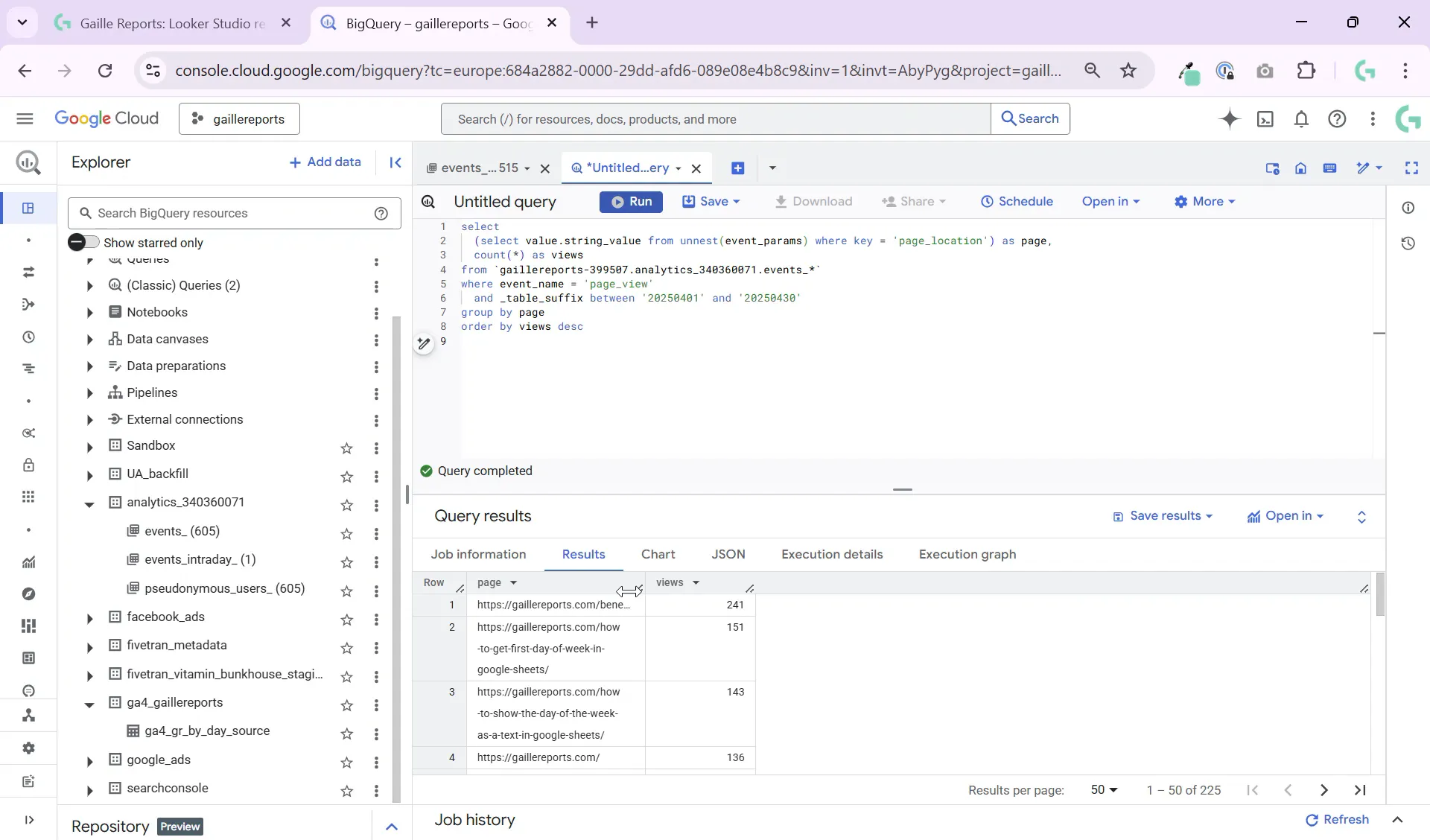
Once you run your query, BigQuery will return a list of pages along with the number of times the specified event occurred on each page. For example, you’ll see your website’s most popular pages by page views, or if you change the event name, pages driving the most conversions or form submissions.
This data is incredibly useful for:
- Landing page performance analysis
- Understanding content engagement
- Auditing conversion paths and funnels
Step 5: Customize the Query for Different Event Types
The beauty of this query is its flexibility. You can replace 'page_view' in the WHERE clause with any event name you want to analyze, such as:
'form_submit'– to see which pages drive form submissions'purchase'– to identify pages generating sales- Custom events specific to your GA4 setup
This lets you pinpoint exactly which pages contribute most to your business goals and user actions.
Additional Tips for Using GA4 Top Pages BigQuery Queries
- Combine with other dimensions: Enhance your query by joining with user or session data to get deeper insights.
- Filter by date ranges: Use
_TABLE_SUFFIXto limit data to specific time periods for trend analysis. - Export results to Looker Studio: Visualize your top pages data in dashboards for easier reporting.
- Save and reuse queries: Create reusable query templates to speed up your analysis workflow.
Summary
Querying your GA4 top pages BigQuery data by event is a straightforward process that unlocks powerful insights about your website’s performance. By extracting the page_location parameter from GA4 event data, you can identify which pages drive the most views, conversions, or any custom event you track.
This simple SQL query serves as a building block for deeper marketing analytics, content audits, and conversion optimization. Plus, it’s easy to adapt for different events and time periods, making it a versatile tool in your analytics toolkit.
If you want to master more Google Analytics, BigQuery, and Looker Studio techniques, check out these helpful articles on my blog:
- What’s New in the Looker Studio Update
- Looker Studio Pro: Is It Worth It? Honest Review & Features You Should Know
- How to Connect BigQuery to Looker Studio: Beginner-Friendly Tutorial
- Google Sheets to BigQuery Made Easy – No Coding Required
Happy querying, and stay tuned for more tips on GA4 and BigQuery analytics!
