If you have ever worked with Looker Studio, you may know that when you connect Google Sheets that contain calculated fields, the values in Looker Studio may be inaccurate. Today I would like to tell you how to calculate ROAS, CTR and CPC correctly and avoid this problem in your report.
I have recorded a video tutorial, check it out:
Let’s start with Google Sheets. How to calculate ROAS, CTR and CPC
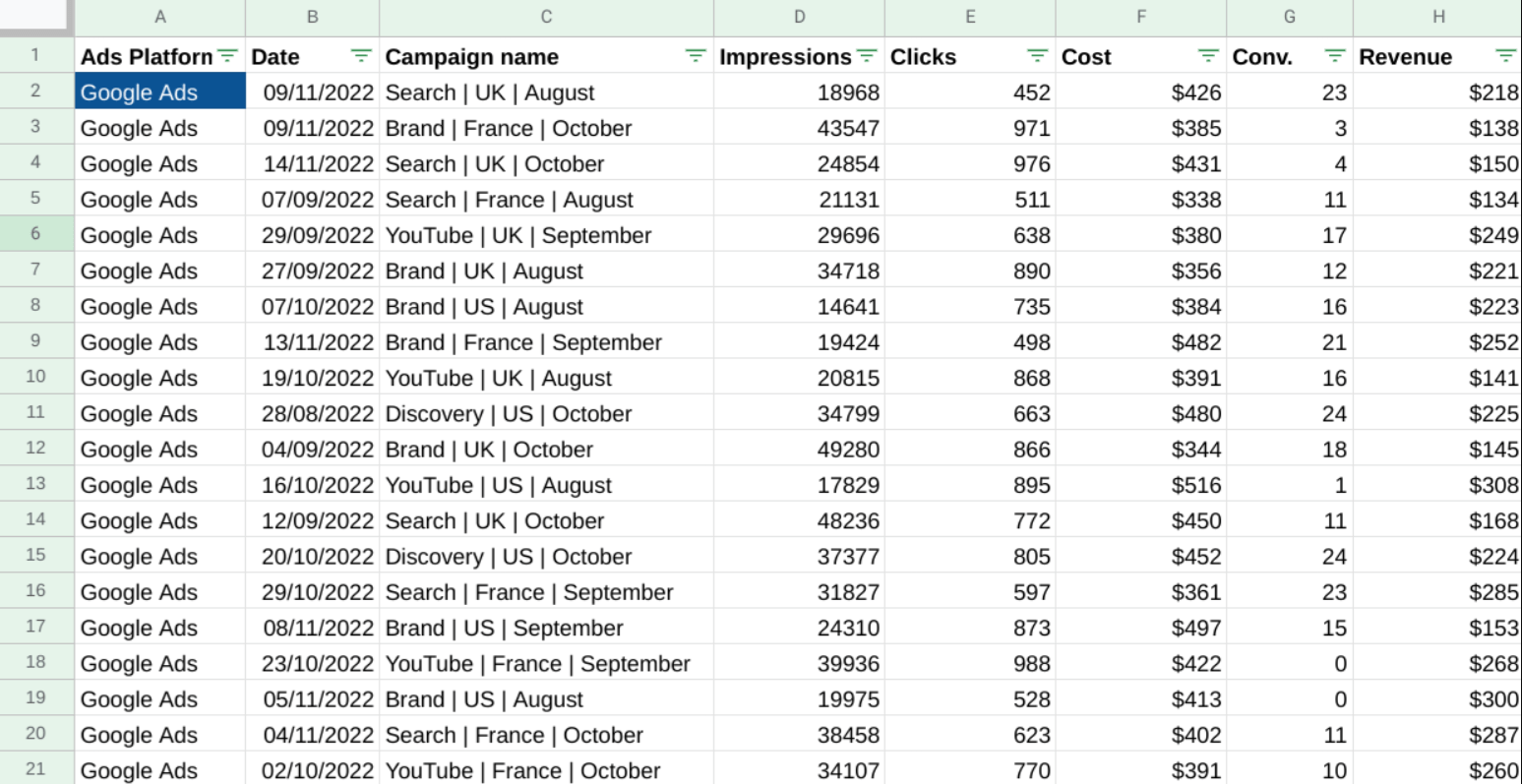
I have a Google Sheets table that contains Campaign name, Impressions, Clicks, Cost, Conversions and Revenue.
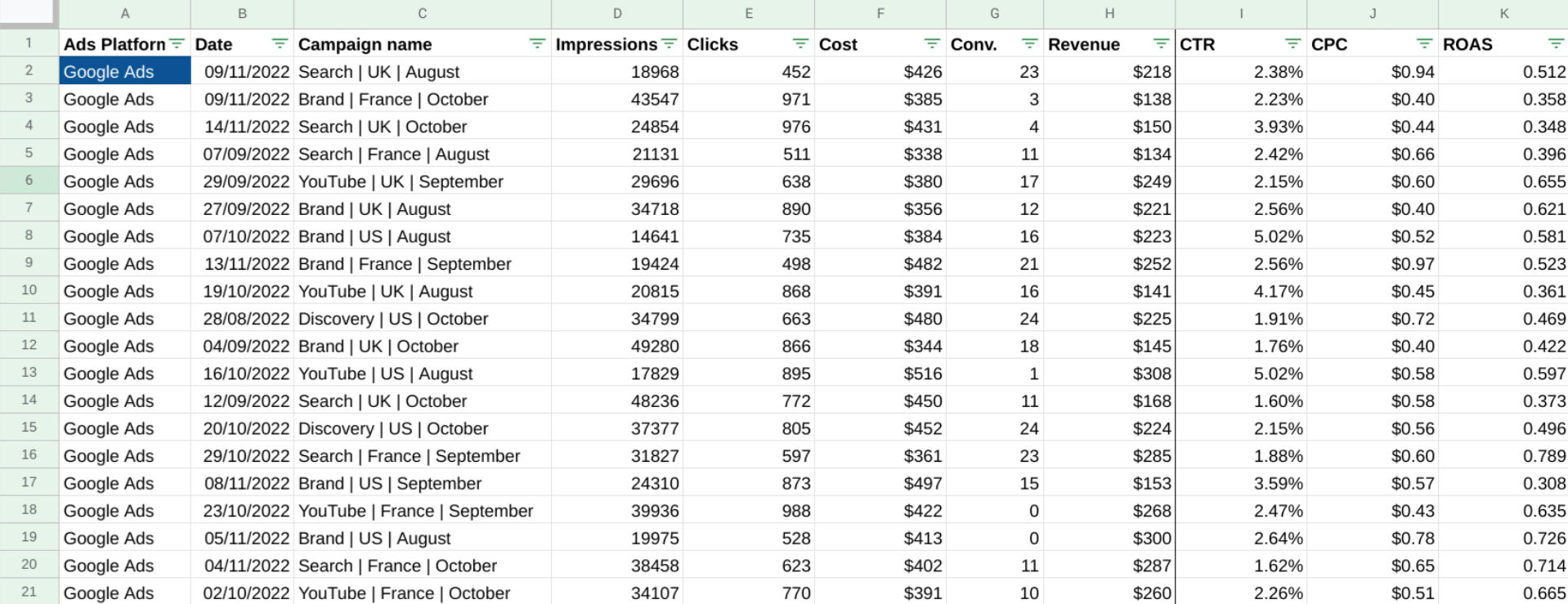
We can count CPC, CTR and ROAS by formulas:
We apply this formula to all the rows and let’s find the total CPC, CTR, ROAS. There are two ways to do it. First one is to find the average of all the rows. The formulas are:
CTR = Average (I:I)
CPC = Average (J:J)
ROAS = Average (K:K)
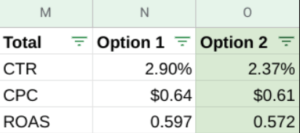
It may be a logical way but it is not an accurate one. The second one and the only correct way to calculate total CPC, CTR, ROAS or any other calculated field like conversion rate etc. is to use summaries, so that our formulas look like:
On the image you can see how different the results of the first and the second way of calculating are.
Moving to Looker Studio
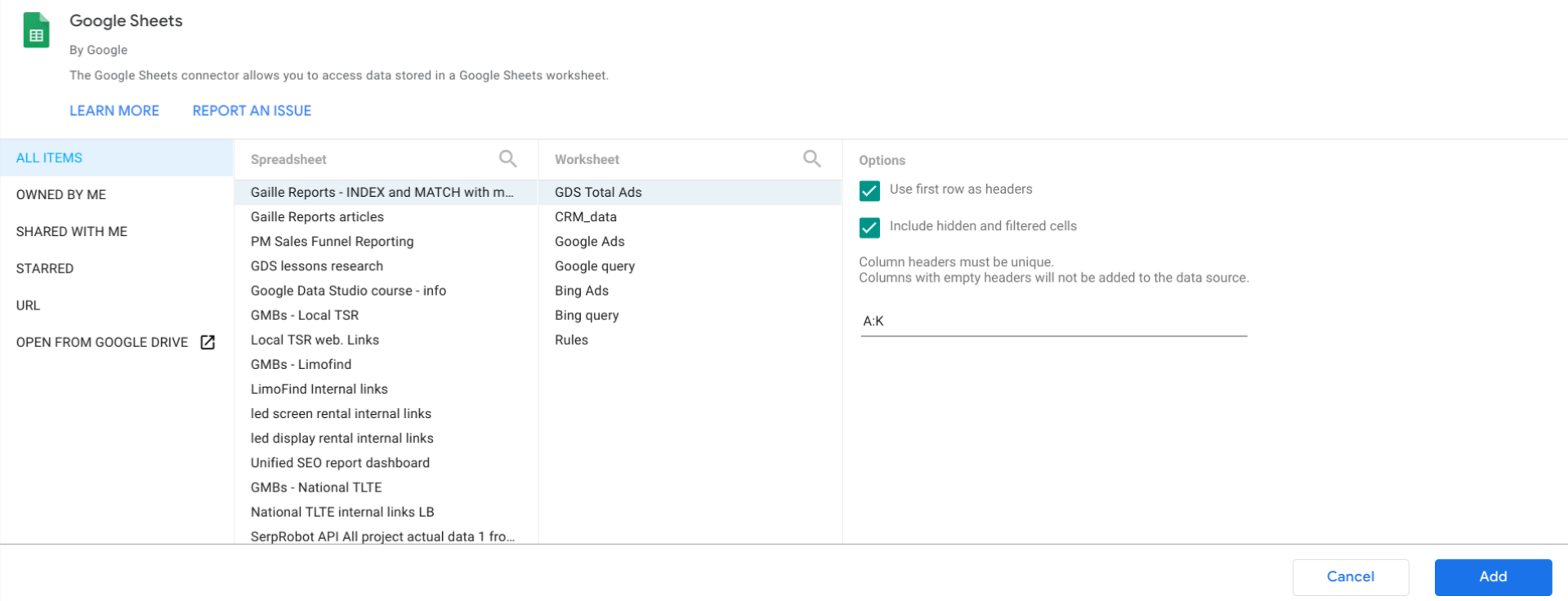
Let’s connect our Google Sheets to the report. I do not need the whole table, just certain columns, so I select A:K.
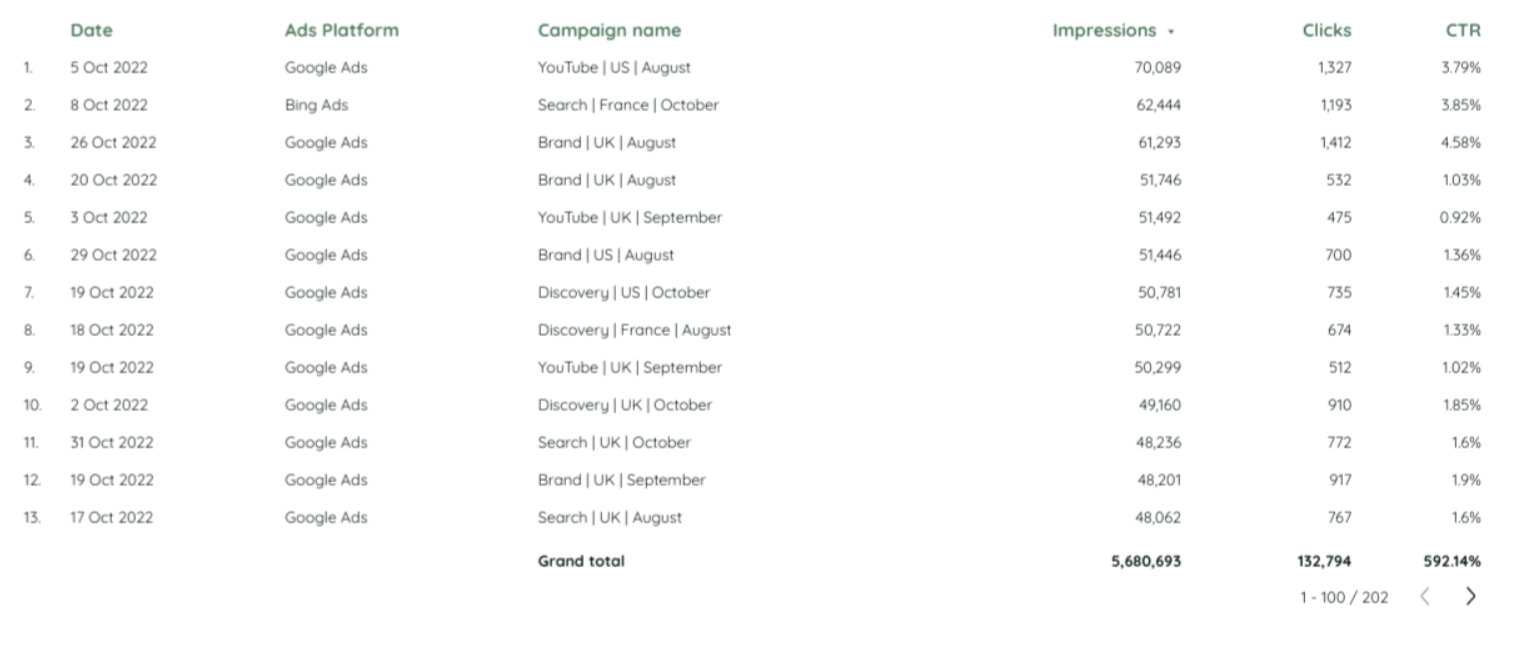
Let’s create a simple table that contains Date, Ads Platform, Campaign Name. As metrics I select Impressions, Clicks and CTR.
Looker Studio has counted the numbers instead of us, using a formula that we actually used to count CTR. If we check the accuracy of it, it’s not correct, it doesn’t coincide with our results in the Sheets. How can we fix it?
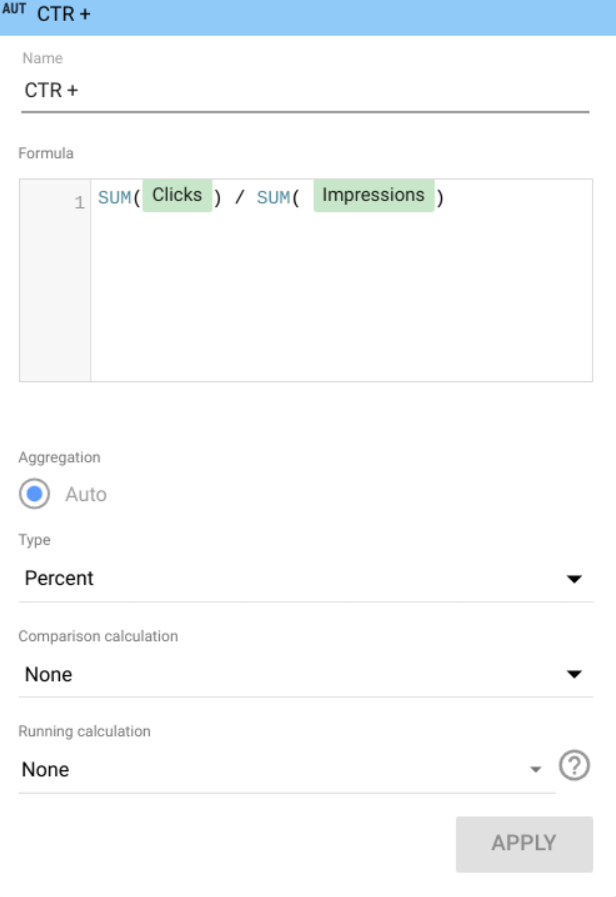
Let’s edit the formula and make it look like this:
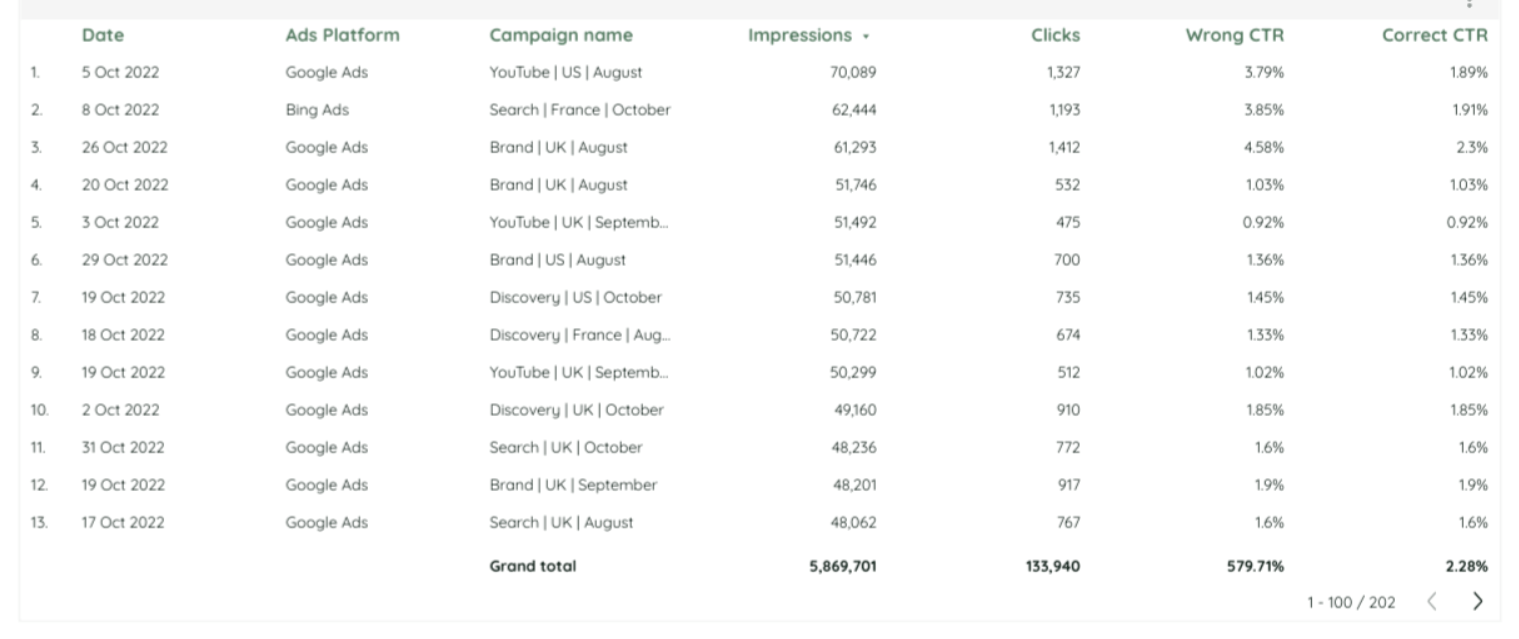
Here is the table with two columns “Wrong CTR” and “Correct CTR” so that you can see the difference.
To sum up, my point about it: if you have some calculated metrics like CTR, CPC, conversion rate, cost per something, when you divide something by something, please create calculated fields in Looker Studio directly and in formulas please use some aggregation of actions like average, summary etc. There is only one correct way to calculate the correct CTR.
Hopefully, this report was educational and useful for you! Please, tell in the comments section if you have ever faced incorrectly calculated fields in Looker Studio!
You can find my other articles in my blog!
To provide the best experiences, we use technologies like cookies to store and/or access device information. Consenting to these technologies will allow us to process data such as browsing behaviour or unique IDs on this site. Not consenting or withdrawing consent, may adversely affect certain features and functions.
Functional
Always active
The technical storage or access is strictly necessary for the legitimate purpose of enabling the use of a specific service explicitly requested by the subscriber or user, or for the sole purpose of carrying out the transmission of a communication over an electronic communications network.
Preferences
The technical storage or access is necessary for the legitimate purpose of storing preferences that are not requested by the subscriber or user.
Statistics
The technical storage or access that is used exclusively for statistical purposes.The technical storage or access that is used exclusively for anonymous statistical purposes. Without a subpoena, voluntary compliance on the part of your Internet Service Provider, or additional records from a third party, information stored or retrieved for this purpose alone cannot usually be used to identify you.
Marketing
The technical storage or access is required to create user profiles to send advertising, or to track the user on a website or across several websites for similar marketing purposes.

 We can count CPC, CTR and ROAS by formulas:
 We apply this formula to all the rows and let’s find the total CPC, CTR, ROAS. There are two ways to do it. First one is to find the average of all the rows. The formulas are:
 Let’s create a simple table that contains Date, Ads Platform, Campaign Name. As metrics I select Impressions, Clicks and CTR.
 Looker Studio has counted the numbers instead of us, using a formula that we actually used to count CTR. If we check the accuracy of it, it’s not correct, it doesn’t coincide with our results in the Sheets. How can we fix it?
Let’s edit the formula and make it look like this:
Looker Studio has counted the numbers instead of us, using a formula that we actually used to count CTR. If we check the accuracy of it, it’s not correct, it doesn’t coincide with our results in the Sheets. How can we fix it?
Let’s edit the formula and make it look like this:
 Here is the table with two columns “Wrong CTR” and “Correct CTR” so that you can see the difference.
 To sum up, my point about it: if you have some calculated metrics like CTR, CPC, conversion rate, cost per something, when you divide something by something, please create calculated fields in Looker Studio directly and in formulas please use some aggregation of actions like average, summary etc. There is only one correct way to calculate the correct CTR.
Hopefully, this report was educational and useful for you! Please, tell in the comments section if you have ever faced incorrectly calculated fields in Looker Studio!
You can find my other articles in my blog!
To sum up, my point about it: if you have some calculated metrics like CTR, CPC, conversion rate, cost per something, when you divide something by something, please create calculated fields in Looker Studio directly and in formulas please use some aggregation of actions like average, summary etc. There is only one correct way to calculate the correct CTR.
Hopefully, this report was educational and useful for you! Please, tell in the comments section if you have ever faced incorrectly calculated fields in Looker Studio!
You can find my other articles in my blog!
