
Complete Guide to IFNULL and COALESCE in Looker Studio
Missing data (nulls) in Looker Studio tables can mess up your dashboard because they can lead to incorrect calculations, like averages or totals, since missing data isn’t counted. They can also cause filters and visualizations to behave unexpectedly, making it harder to get accurate insights from your data.
If you want to know how to get rid of annoying nulls using IFNULL and COALESCE formulas – keep reading this article!
But first of all, check out this video tutorial:
Task explanation
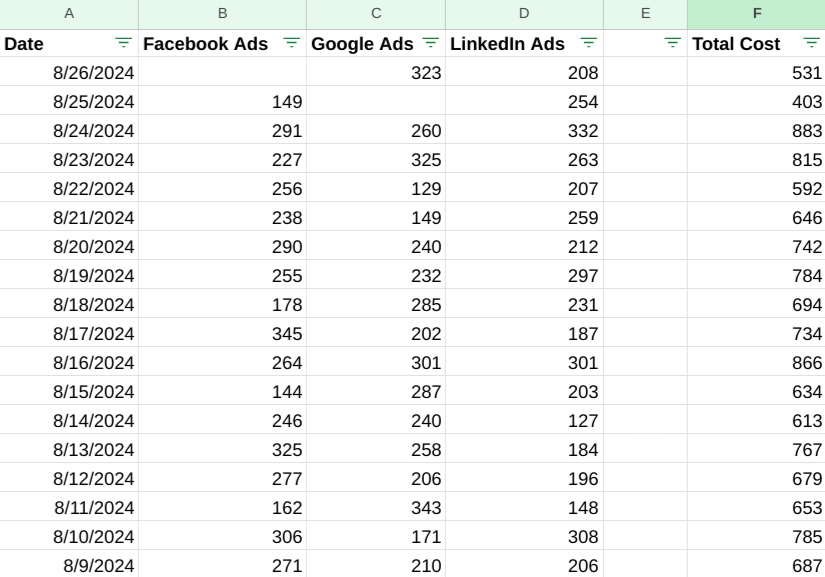
I’ve created a simple table with date, costs from different ads platforms and total cost.

Here is this table with cost data from ads platforms in Looker Studio. You can see that there are nulls in the columns. They will make our future calculations incorrect.
For example, if we add a total cost, there is going to be null as well.
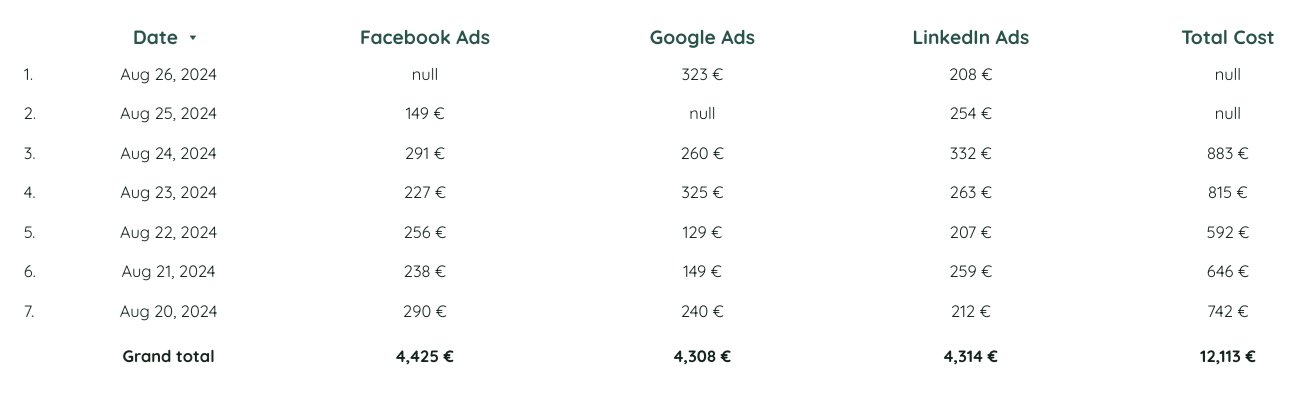
If you use the Supermetrics connector to pull up your data, you can substitute nulls with 0, so the calculations will be correct. But in this case, when we directly connect our manually made Google Sheets with empty fields to Looker Studio, we have nulls.
IFNULL formula
Let’s try using IFNULL formula to fix the table. If we write a formula like: IFNULL (Facebook Ads, 0), we will have 0 in result.
So, to count a total cost, considering that in the columns there may be nulls, we write a following formula:
sum(IFNULL(Facebook Ads,0) + IFNULL(Google Ads,0) + IFNULL(LinkedIn Ads,0))

In the end we got a sum of 13,047 euros, and if we compare it to the summary in Google Sheets, it will be the same. So, here is a working method for you to get rid of nulls!
Updating Google Sheets
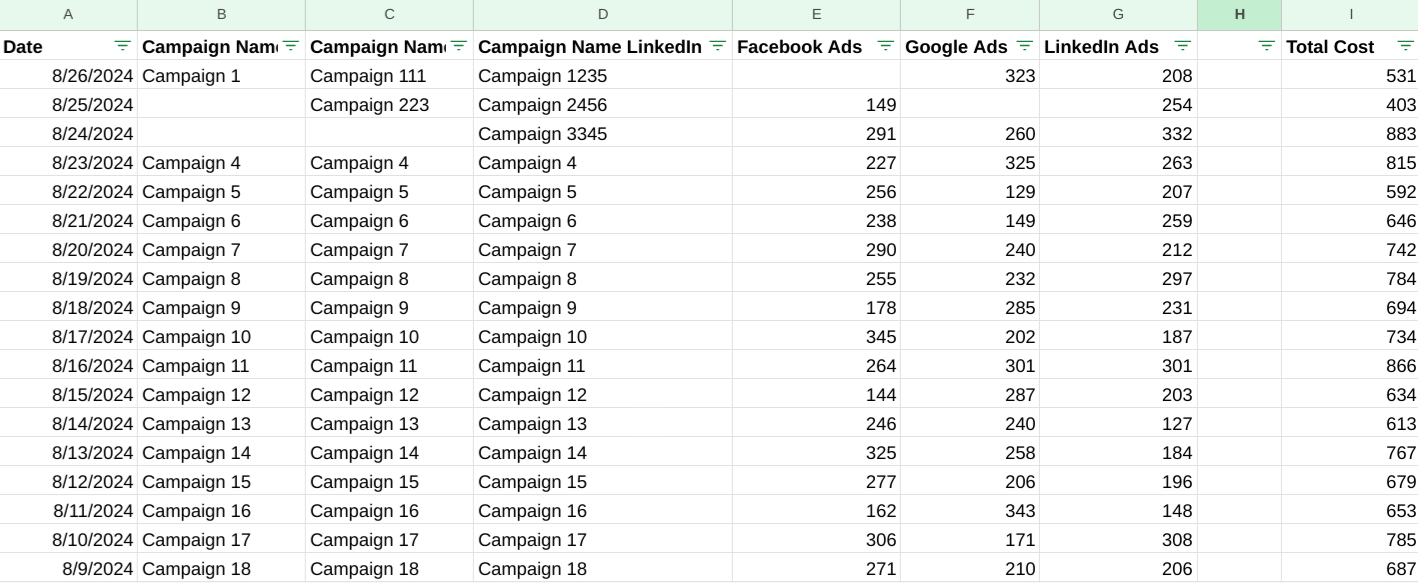
I’ve added three columns – Campaign Name Facebook Ads, Campaign Name Google Ads and Campaign Name LinkedIn Ads. But, as you can see, some fields are missing, and in Looker Studio there will also be nulls. How can we fix nulls in this case?
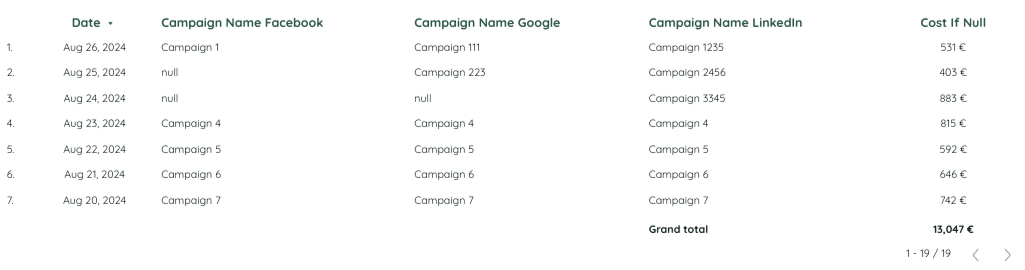
Here we are in Looker Studio. Our table is already updated.
Now what we need to do is – when calculating total summary, not to take into account the field with null, but to take the data from the next column that has data. So If there is no data in the Facebook Ads column, we’ll take data from Google Ads, and if there is no data in Google Ads, we’ll take data from LinkedIn Ads.
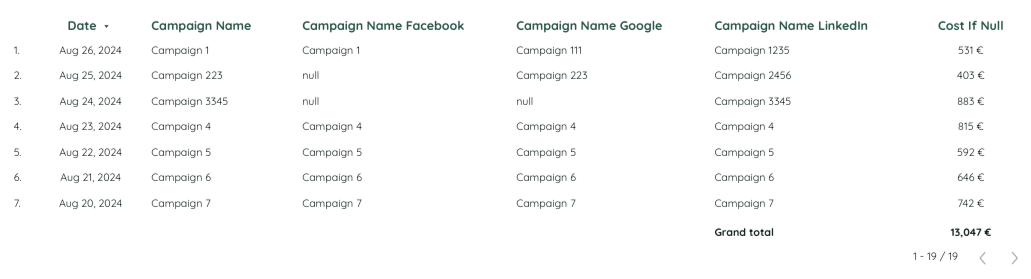
Let’s add a new metric and name it Campaign Name. Using the IFNULL formula in this case will give us inaccurate results, as we have three columns in general, and two columns with missing data. We can easily fix it with the COALESCE formula:
COALESCE(Campaign Name Facebook,Campaign Name Google,Campaign Name LinkedIn)
It’s a perfect formula to fix missing data issues in Looker Studio when you have 3 fields.
Conclusion
Hope this article was interesting and useful for you. I would really like to recommend you to check out Cohort Analysis Template and take advantage of the current sale price!
Share your opinion about the article in the comments!
Related guides
Tool I use for Looker Studio connectors
If you’re building dashboards in Looker Studio and need data from ad platforms, this is something I personally use quite often.
Windsor.ai connectors for Looker Studio let you pull marketing data directly into your reports so everything updates automatically.
If you decide to try it, they also offer a 10% discount with the promo code gaillereports.
Tool I use for marketing dashboards
A tool I’ve used many times for marketing dashboards is Supermetrics.
It helps pull data from different marketing platforms into tools like Google Sheets, BigQuery, or Looker Studio so your reports can update automatically.

